# Deployment & Agent Management
Installing, configuring, updating, and verifying the Cyber Crucible agent, including onboarding, system requirements, and network configuration.
# How do I test the TLS connection to these domains?
Beyond just pinging the domains used by Cyber Crucible to make sure that your endpoint can reach all of the correct network address, the Cyber Crucible Agent installer includes a test argument that ensures a valid TLS/SSL connection can be made in both directions to all required servers.
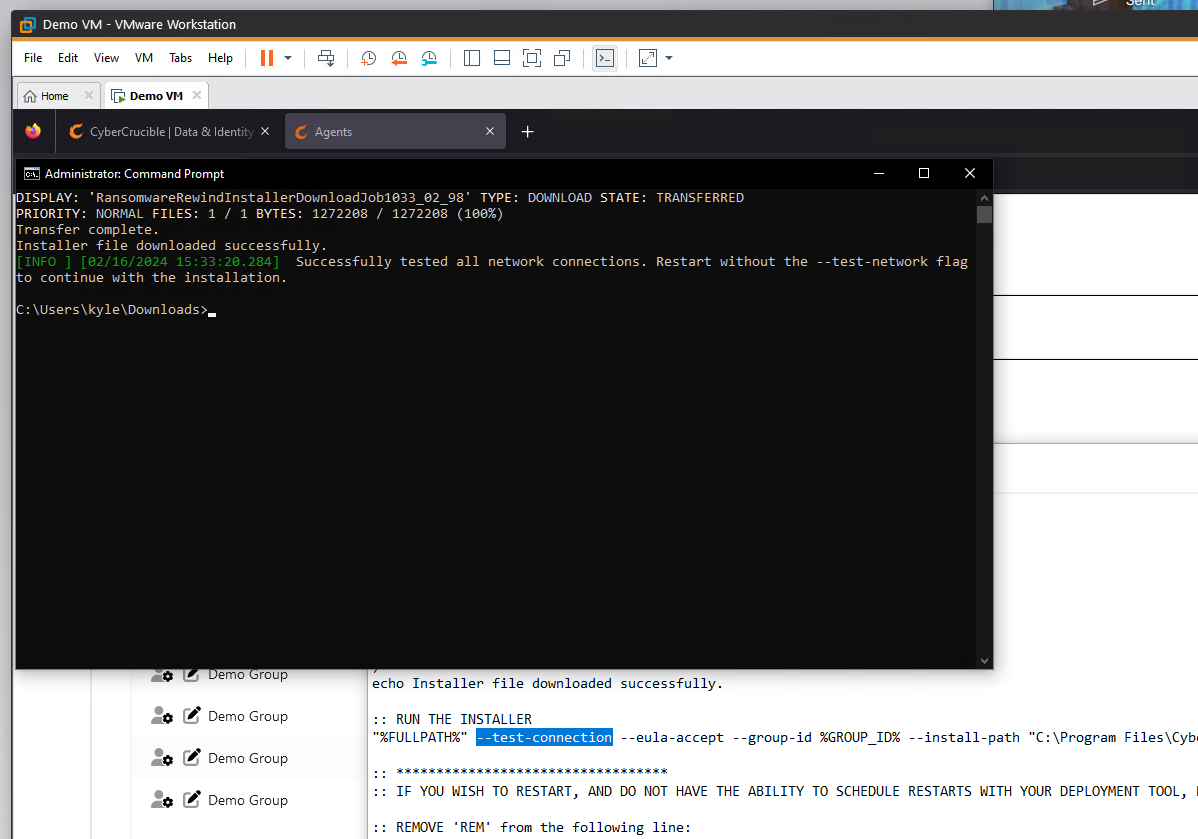Simply add `--test-connection` to the installer execution, making sure to still include group id(s) and OAuth tokens that are necessary to perform authentication. Seen above is a screenshot showing the only modification needed to the provided .bat script, and a successful output.
# Offline/Online Agent Monitoring
## Agents Page
On the Agents page, the date and time of the last check-in **per activity** is tracked. Generically speaking, if a software agent is functioning and connected to the Internet, each behavior should have a date of less than a couple hours. Some activities are triggered by activities on the endpoint, while others are set per timers, but with a “jitter” offset of up to 30 seconds, so that customers don’t have surges in network activity.
## Offline Notification Management
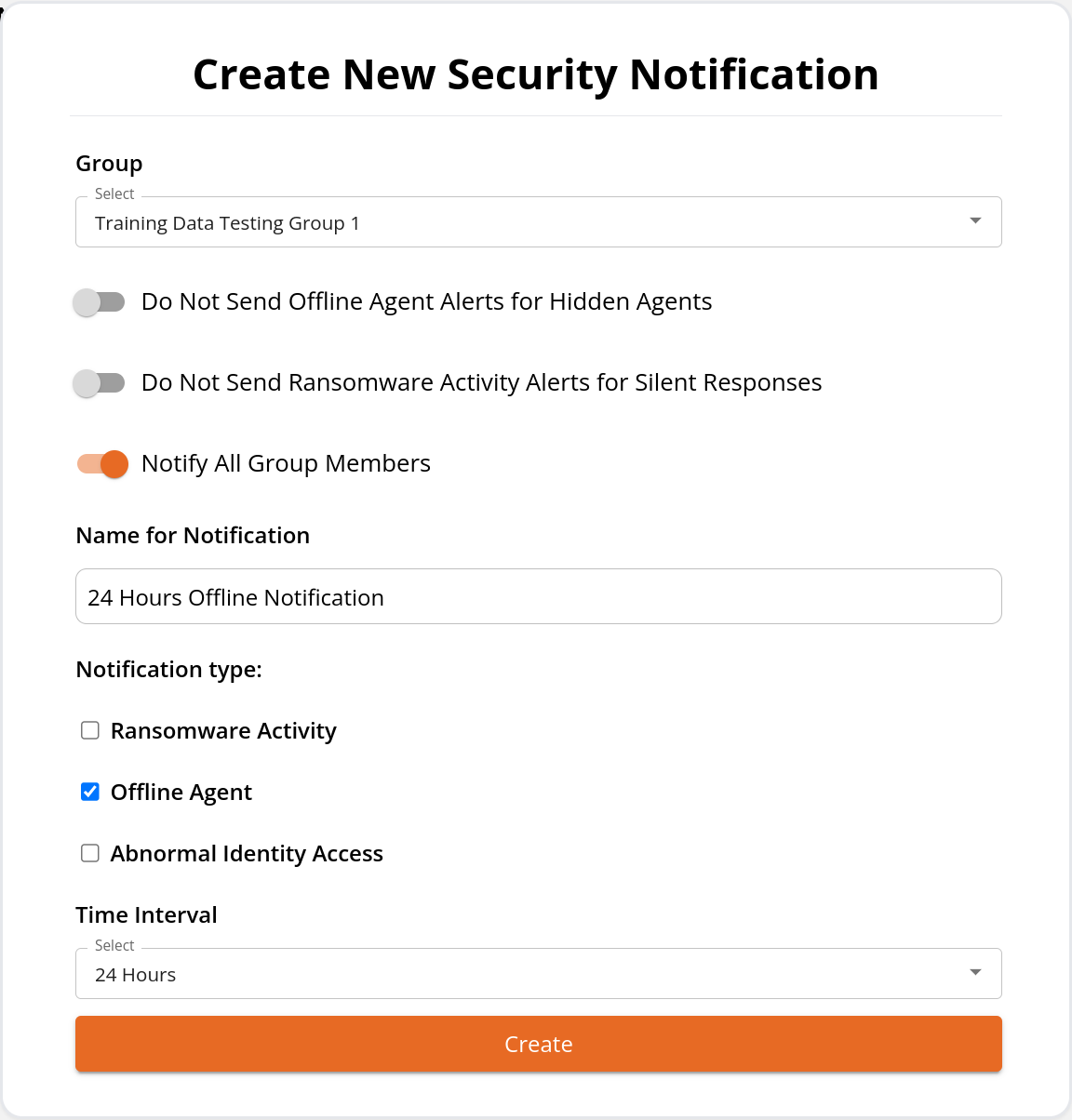
To setup notification of offline agents, use the Security Notifications page.
These notifications are intended for the following situations:
1. There is a network issue between an agent, and the Cyber Crucible servers. That can be either due to a firewall (hacker inspired, or just IT operations), or the agent is running but offline. Protection is maintained during offline periods, but security team notifications will not occur until the agent is back online.
2. There is an issue with the Cyber Crucible software. This is very, very rare. Please [open a support ticket](https://cybercrucible.atlassian.net/servicedesk/customer/portal/1) with Cyber Crucible immediately, if this occurs.
3. The machine is powered off. This is the most common scenario. Discussion of best practices is next.
### Offline Notification best practices
An important consideration for offline notification, is that a machine which has been powered off, will appear offline to Cyber Crucible’s servers. Workstations, prone to being turned on and off during normal business operations, would produce offline notifications during lunch breaks, travel between locations, or during holidays.
Best practices for groups already split servers from workstations. Servers are typically best served with shorter offline notification periods, in case of an issue. Workstation focused groups are best for longer periods of appearing offline.
Many Cyber Crucible customers find it best to only create automated notifications for server groups, and periodically filter one of the date fields on the Manage Agents page by a date, such as “Show me agents who have not had their Machine Data Update field updated in the past week”.
# Agents That Are Not Fully Updated
Cyber Crucible agents require a reboot to update. Greater understanding of the update algorithms can be found [here](https://knowledgebase.cybercrucible.com/books/3047523.html). When an agent reports that a reboot will result in an update, the Agents page lists which machines require an update, and are ready to update upon reboot. Sometimes machines, if they are not rebooted often (typically servers), will stage multiple updates before actually upgrading. We see an example of that in the screenshot. The last reboot time is also available.
The weekly Cyber Crucible executive report identifies that number of agents which require an upgrade, and how many of those are ready to upgrade as soon as they are rebooted. The two most common reasons a machine requires an update, but are not ready/staged, are:
1. The machine has been offline, such as an employee on vacation.
2. The machine had a hardware or major software failure/refresh, and Cyber Crucible is actually no longer on that machine.
Other than those two instances, updates normally happen very quickly, and without administrator involvement outside of normal patching and rebooting activities.
# What versions of Windows are supported by Cyber Crucible?
**Desktop Version**
**Server Version**
**Support**
11
10
8.1
8
2025
2022
2019
2016
2012 R2
2012 R1
Fully supported.
7
2008 R2
Must be patched for SHA-2 code signing support.
Vista and below
2008 R1 and below
Not supported.
# What are Normal Resource Consumption Rates for RAM and CPU?
Typical CPU usage is 1% or lower (which shows as 0% on most monitoring tools, like Task Manager).
Typical RAM usage is less than 10 MB. Most desktop and server usage is around 5MB.
We also monitor memory usage of the driver in kernel space, to monitor for any issues.
# How can I tell Cyber Crucible is running on the system?
# Services
Open up Task Manager.
Click on the Services tab.
Sort by name if necessary, and scroll to CyberCrucibleAgent/ Cyber Crucible Agent
fltmc.exe lists loaded drivers.
There are likely several, so the find command shows only the Cyber Crucible driver, called CCRRSecMon.
If the driver is listed, it is loaded and running correctly in the operating system.
# Which domains are used by Cyber Crucible?
**Domain**
**Port**
**Protocol**
**Component**
**Producers of Traffic**
**Purpose**
**Certificate Validation/Revocation Domains (as of 1 May 2024)**
dashboard.cybercrucible.com
443
HTTPS
Web Application
Users, typically assigned members of the IT, Security, and Compliance teams, who manage Cyber Crucible software. This web application is built on ReactJS.
This domain is tied to the administration panel for Cyber Crucible software. This admin panel is used to manage all licenses, and software agents. It is used to investigate and observe potential data or identity extortion incidents.
OCSP URL: [http://r3.o.lencr.org](http://r3.o.lencr.org)
CA URL/Issuer: [http://r3.i.lencr.org](http://r3.i.lencr.org)
agent.tasking.rpp.cybercrucible.com
443
HTTPS
Windows Service
Cyber Crucible software agents use this domain. Users do not interact with this server, and this server is managed by a separate Federated ID allocation.
Cyber Crucible software agents use this domain to receive tasking, and submit data to the agent-specific REST server.
OCSP URL: [http://r3.o.lencr.org](http://r3.o.lencr.org)
CA URL/Issuer: [http://r3.i.lencr.org](http://r3.i.lencr.org)
cognito-idp.us-west-2.amazonaws.com
443
HTTPS
Web Application
Users of the web application, or custom REST API calls by a client will produce traffic to the AWS Cognito service during login.
Cyber Crucible currently uses AWS Cognito for user pool and Federated Identity services, in support of software, REST API, and user oAuth 2.0 protected communications and user management.
CRL distribution URL: [http://crl.r2m03.amazontrust.com/r2m03.crl](http://crl.r2m03.amazontrust.com/r2m03.crl)
OCSP URL: [http://ocsp.r2m03.amazontrust.com](http://ocsp.r2m03.amazontrust.com)
CA URL/Issuer: [http://crt.r2m03.amazontrust.com/r2m03.cer](http://crt.r2m03.amazontrust.com/r2m03.cer)
CRL distribution URL: [http://crl.r2m02.amazontrust.com/r2m02.crl](http://crl.r2m02.amazontrust.com/r2m02.crl)
OCSP URL/Issuer: [http://ocsp.r2m02.amazontrust.com](http://ocsp.r2m02.amazontrust.com)
CRL distribution URL: [http://crt.r2m02.amazontrust.com/r2m02.cer](http://crt.r2m02.amazontrust.com/r2m02.cer)
ransomwarerewind.auth.us-west-2.amazoncognito.com
443
HTTPS
Web Application
Users of the web application, or custom REST API calls by a client will produce traffic to the AWS Cognito service during login.
Cyber Crucible currently uses AWS Cognito for user pool and Federated Identity services, in support of software, REST API, and user oAuth 2.0 protected communications and user management.
CRL distribution URL: [http://crl.r2m03.amazontrust.com/r2m03.crl](http://crl.r2m03.amazontrust.com/r2m03.crl)
OCSP URL: [http://ocsp.r2m03.amazontrust.com](http://ocsp.r2m03.amazontrust.com)
CA URL/Issuer: [http://crt.r2m03.amazontrust.com/r2m03.cer](http://crt.r2m03.amazontrust.com/r2m03.cer)
CRL distribution URL: [http://crl.r2m02.amazontrust.com/r2m02.crl](http://crl.r2m02.amazontrust.com/r2m02.crl)
OCSP URL/Issuer: [http://ocsp.r2m02.amazontrust.com](http://ocsp.r2m02.amazontrust.com)
CRL distribution URL: [http://crt.r2m02.amazontrust.com/r2m02.cer](http://crt.r2m02.amazontrust.com/r2m02.cer)
Cyber Crucible software agents use this domain. Users do not use this domain.
Cyber Crucible software agents use this domain, which is AWS Cognito, for user pool and Federated Identity services, in support of their OAuth 2.0 protected communications and software management.
CRL distribution URL: [http://crl.r2m03.amazontrust.com/r2m03.crl](http://crl.r2m03.amazontrust.com/r2m03.crl)
OCSP URL: [http://ocsp.r2m03.amazontrust.com](http://ocsp.r2m03.amazontrust.com)
CA URL/Issuer: [http://crt.r2m03.amazontrust.com/r2m03.cer](http://crt.r2m03.amazontrust.com/r2m03.cer)
CRL distribution URL: [http://crl.r2m02.amazontrust.com/r2m02.crl](http://crl.r2m02.amazontrust.com/r2m02.crl)
OCSP URL/Issuer: [http://ocsp.r2m02.amazontrust.com](http://ocsp.r2m02.amazontrust.com)
CRL distribution URL: [http://crt.r2m02.amazontrust.com/r2m02.cer](http://crt.r2m02.amazontrust.com/r2m02.cer)
agent.oauth.rpp.cybercrucible.com
443
HTTP
Windows Service
Cyber Crucible software agents use this domain. Users do not use this domain.
Cyber Crucible software agents use this domain for OAuth 2.0 protected communications and software management. This domain replaces the deprecated AWS Cognito OAuth url above.
installerfiles.rpp.cybercrucible.com
443
HTTPS
HTTPS File Server
Cyber Crucible installation and update files (drivers, services, etc.)
Cyber Crucible’s installation and update files are stored in this website. It is used to do initial agent installation as well as fetch files for any required updates.
OCSP URL: [http://r3.o.lencr.org](http://r3.o.lencr.org)
CA URL/Issuer: [http://r3.i.lencr.org](http://r3.i.lencr.org)
[ipv4.icanhazip.com](http://ipv4.icanhazip.com)
443
HTTPS
Windows Service
Cyber Crucible software agents use this domain.
Cyber Crucible software agents query this domain to correlate the IPv4 WAN address for an agent.
OCSP URL: [http://r3.o.lencr.org](http://r3.o.lencr.org)
CA URL/Issuer: [http://r3.i.lencr.org](http://r3.i.lencr.org)
ipv6.icanhazip.com
443
HTTPS
Windows Service
Cyber Crucible software agents use this domain.
Cyber Crucible software agents query this domain to correlate the IPv6 WAN address for an agent.
OCSP URL: [http://r3.o.lencr.org](http://r3.o.lencr.org)
CA URL/Issuer: [http://r3.i.lencr.org](http://r3.i.lencr.org)
r3.o.lencr.org
80
OCSP
Windows Service
Web application users and Cyber Crucible software agents both use this domain.
This domain is the Let’s Encrypt TLS certificate validation and revocation check (OCSP) check server. Without access to this server, agents and the web application communications may not work.
rs.i.lencr.org
80
HTTP
Windows Service
Web application users and Cyber Crucible software agents both use this domain.
This domain is the Let’s Encrypt TLS Certificate Authority (CA) server, that is used by validate TLS certificates. Without access to this server, agents and the web application communications may not work.
crl.r2m03.amazontrust.com
80
HTTP
Windows Service
Web application users and Cyber Crucible software agents both use this domain.
This domain is the Amazon Web Services (AWS) certificate validation and revocation check (CRL) server. Without access to this server, agents and web application users cannot gain validated credentials, to then access secured Cyber Crucible resources.
crl.r2m02.amazontrust.com
80
HTTP
Windows Service
Web application users and Cyber Crucible software agents both use this domain.
This domain is the Amazon Web Services (AWS) certificate validation and revocation check (CRL) server. Without access to this server, agents and web application users cannot gain validated credentials, to then access secured Cyber Crucible resources.
ocsp.r2m03.amazontrust.com
80
OCSP
Windows Service
Web application users and Cyber Crucible software agents both use this domain.
This domain is the Amazon Web Services (AWS) certificate validation and revocation check (OCSP) server. Without access to this server, agents and web application users cannot gain validated credentials, to then access secured Cyber Crucible resources.
ocsp.r2.m02.amazontrust.com
80
OCSP
Windows Service
Web application users and Cyber Crucible software agents both use this domain.
This domain is the Amazon Web Services (AWS) certificate validation and revocation check (OCSP) server. Without access to this server, agents and web application users cannot gain validated credentials, to then access secured Cyber Crucible resources.
crt.r2m03.amazontrust.com
80
HTTP
Windows Service
Web application users and Cyber Crucible software agents both use this domain.
This domain is the Amazon Web Services (AWS) TLS Certificate Authority (CA) server, that is used by validate TLS certificates. Without access to this server, agents and the web application cannot gain validated credentials, to then access secured Cyber Crucible resources.
crt.r2m02.amazontrust.com
80
HTTP
Windows Service
Web application users and Cyber Crucible software agents both use this domain.
This domain is the Amazon Web Services (AWS) TLS Certificate Authority (CA) server, that is used by validate TLS certificates. Without access to this server, agents and the web application cannot gain validated credentials, to then access secured Cyber Crucible resources.
Cyber Crucible software agents use this domain. Users do not interact with this server, and this server is managed by a separate Federated ID allocation.
Cyber Crucible software agents use this domain to receive tasking, and submit data to the agent-specific REST server.
OCSP URL: [http://r3.o.lencr.org](http://r3.o.lencr.org)
CA URL/Issuer: [http://r3.i.lencr.org](http://r3.i.lencr.org)
Cyber Crucible’s installation and update files are stored in this S3 bucket. It is used to do initial agent installation as well as fetch files for any required updates.
CRL distribution URL: [http://crl.r2m03.amazontrust.com/r2m03.crl](http://crl.r2m03.amazontrust.com/r2m03.crl)
OCSP URL: [http://ocsp.r2m03.amazontrust.com](http://ocsp.r2m03.amazontrust.com)
CA URL/Issuer: [http://crt.r2m03.amazontrust.com/r2m03.cer](http://crt.r2m03.amazontrust.com/r2m03.cer)
CRL distribution URL: [http://crl.r2m02.amazontrust.com/r2m02.crl](http://crl.r2m02.amazontrust.com/r2m02.crl)
OCSP URL/Issuer: [http://ocsp.r2m02.amazontrust.com](http://ocsp.r2m02.amazontrust.com)
CRL distribution URL: [http://crt.r2m02.amazontrust.com/r2m02.cer](http://crt.r2m02.amazontrust.com/r2m02.cer)
Users, typically assigned members of the IT, Security, and Compliance teams, who manage Cyber Crucible software. Custom REST API programs developed by customers will also use this domain.
This domain is the REST server which the ReactJS dashboard uses to dynamically create, retrieve, update, and delete relevant data from the web application.
OCSP URL: [http://r3.o.lencr.org](http://r3.o.lencr.org)
CA URL/Issuer: [http://r3.i.lencr.org](http://r3.i.lencr.org)
# How do I know when an agent is done with Self Configuration After Installation?
On the Agents page on the dashboard, each agent has a few timestamps denoting the last time it received certain types of information. An agent is considered done with self configuration when, in addition to having a valid license assigned, it has recorded timestamps for the following columns:
- [Group Management](#bkmrk-group-management)
- [Setting up Agent Security Alerts](#bkmrk-setting-up-agent-sec)
- [Agent Installation Planning Best Practices](#bkmrk-agent-installation-p)
- [Installing the Agent](#bkmrk-installing-the-agent)
- [Update Strategies for Groups and Agents](#bkmrk-update-strategies-fo)
- [How to Investigate the Root Cause of an Extortion Response](#bkmrk-how-to-investigate-t)
- [Tailored Behaviors](#bkmrk-tailored-behaviors)
- [Rest Integration](#bkmrk-rest-integration)
# Group Management
Before installing agents, users may want to prepare by setting up their groups. Follow the Group Management instructions [here](https://knowledgebase.cybercrucible.com/books/group-management).
# Setting up Agent Security Alerts
Users may setup email notifications for security events including ransomware activities, abnormal identity accesses, and offline agents. Instructions can be found [here](https://knowledgebase.cybercrucible.com/books/security-email-notifications).
# Agent Installation Planning Best Practices
Some environments have similar user, application, and system behavior and configuration throughout their business. Others have specialized groups that behave differently, such as a sales team versus a division of software engineers.
Deployment and configuration is so fast that taking a couple minutes to plan an installation to a subset of desktops or servers that share the same business behaviors or applications will allow you to assess if any applications need to be accounted for.
Additionally, it is highly common to find Cyber Crucible discover previously unknown (and unauthorized) management software and VPNs, unauthorized admin scripts, mis-configured software, or even infections during initial rollout.
# Installing the Agent
When you are ready to install your agents, instructions can be found [here](https://knowledgebase.cybercrucible.com/books/how-to-install-cyber-crucible) and [here](https://cybercrucible.atlassian.net/wiki/x/AQDDCw)
# Update Strategies for Groups and Agents
To manage the update strategies for groups and agents, follow the instructions [here](https://cybercrucible.atlassian.net/wiki/spaces/CYB/pages/29130753/How+can+I+manage+update+strategies+for+groups+and+agents).
# How to Investigate the Root Cause of an Extortion Response
The Extortion Response page can be found under the Operations tab in the sidebar. The instructions on how to investigate the root cause of an alert can be found [here](https://cybercrucible.atlassian.net/wiki/spaces/CYB/pages/4948043/How+can+I+investigate+the+root+cause+of+an+alert).
# Tailored Behaviors
Instructions on creating tailored behaviors can be found [here](https://knowledgebase.cybercrucible.com/books/application-whitelisting).
# Rest Integration
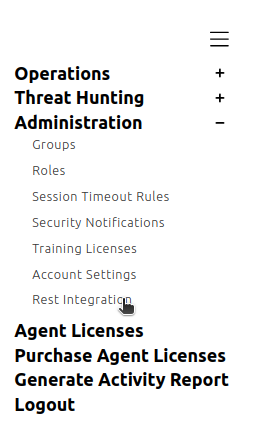
Some users may wish to integrate with our rest server. The Rest Integration page with documentation can be found on our [website](https://dashboard.cybercrucible.com/login) under the Administration tab in the sidebar.
# Deploying to an Already Infected Environment
- [Background](#bkmrk-background)
- [What Happens Immediately Upon Install](#bkmrk-what-happens-immedia)
- [What Happens to Dormant Malware, Waiting for Future Tasking?](#bkmrk-what-happens-to-dorm)
- [Additional Details - Reboots Can Be Valuable](#bkmrk-additional-details--)
# Background
Cyber Crucible customer deployments routinely result in discovery of previously unknown infections. Networks are normally not infection-free, even if existing cybersecurity defensive tools have given the all-clear.
A ransomware attack provides a highly visible point of demarcation, or, pivotal point, for a company to measure how often hackers successfully re-attack, and how successful they are.
- Open Source reporting and threat intelligence reveals a re-attack rate of non-Cyber Crucible customers of around 80%.
- Cyber Crucible observed around 10% of endpoints have at least one identity theft attempt, such as passwords, keys, or tokens, per 90 day period.
- Cyber Crucible observes attackers attempting to re-gain a foothold in an environment approximately monthly.
From an incident response or forensic standpoint, Cyber Crucible is an excellent tool to regain control of the network. Especially for victims of attack, we suspect that the attackers are maintaining visibility to the victims' state of recovery and financial health, to better time when to strike again.
# What Happens Immediately Upon Install
Cyber Crucible automatically begins suspending running programs that are observed to be behaving maliciously.
Roll-out of Cyber Crucible product can result in multiple programs across multiple machines being suspended as the environment is cleaned up.
At times, a partial roll-out of Cyber Crucible can result in the hacker attempting to regain control through the machines that do not have Cyber Crucible protection.
For example, Cyber Crucible was once installed on just a portion of the desktops, of a recent data breach victim. The hackers attempted to uninstall Cyber Crucible by connecting from the unprotected machines, then eventually started shutting the protected machines off.
# What Happens to Dormant Malware, Waiting for Future Tasking?
Malware that is not taking action on behalf of attackers, is triggered after the malware starts to access data.
Let’s run through a scenario:
Two machines have malware on them. Let’s call them Machine A, and Machine B.
Both samples of malware are currently undetectable by your favorite security tools.
Machine A’s malware does nothing, but waits for instructions. Cyber Crucible does not detect the malware. The malware is also not yet detectable by other security tools.
Machine B’s malware being attempting to access data or identity data. Immediately after a successful attack, the most common behaviors we see, of attackers tasking their malware, is to ensure they have fresh identity data such as passwords or tokens, and to enumerate new data. So, part, “get the new passwords after the administrators reset passwords”, and, part, “keep tabs to look for new data”.
On Machine B, Cyber Crucible immediately suspends the application.
After anywhere from a month to a year, Machine A’s malware is caught after enough victims have reported the malware to security vendor databases. The more disciplined the attackers are in the distribution of that sample, the longer that particular malware will go undetected.
Machine B’s malware has been neutralized, frozen in place.
Machine A’s malware is trapped. The second (well, 100 milliseconds) it tries to access any data or identity information, Machine A’s malware is suspended. The client is protected, even though the malware exists for days, up to years, without the malware being detected by other tools.
# Additional Details - Reboots Can Be Valuable
Some of our analytics are most accurate when the lifecycle of the process is able to be tracked from start of application to the present state.
Rebooting a machine after install can be advantageous.
Programs already running prior to install will not have full analytical inspection from Cyber Crucible. Rebooting forces those programs to re-start, thus providing full inspection to all programs.
# How can I test connection to these domains?
# Checking Certificate Chains
The following PowerShell script may be used to output the certificate chain obtained by a particular machine. This can be useful for debugging SSL issues or investigating the impact of an SSL firewall configuration.
## Usage
On the PowerShell command line, call the script with the -TargetHost parameter. For example:
```
.\Get-SslCertificateChain.ps1 -TargetHost "agent.oauth.rpp.cybercrucible.com"
```
On yields the following output:
```
SSL Connection established to agent.oauth.rpp.cybercrucible.com:443
Certificate Chain:
Leaf Certificate (Subject): CN=agent.oauth.rpp.cybercrucible.com
True
- Subject: CN=agent.oauth.rpp.cybercrucible.com
Issuer: CN=E7, O=Let's Encrypt, C=US
Thumbprint: 2E401711BBC229F34B8A13D0233264CFBB155C82
Valid From: 10/05/2025 06:06:01
Valid To: 01/03/2026 05:06:00
- Subject: CN=E7, O=Let's Encrypt, C=US
Issuer: CN=ISRG Root X1, O=Internet Security Research Group, C=US
Thumbprint: 3B73C17E3DF87CF3AA77F1389219EB5EDD519E7F
Valid From: 03/12/2024 20:00:00
Valid To: 03/12/2027 18:59:59
- Subject: CN=ISRG Root X1, O=Internet Security Research Group, C=US
Issuer: CN=ISRG Root X1, O=Internet Security Research Group, C=US
Thumbprint: CABD2A79A1076A31F21D253635CB039D4329A5E8
Valid From: 06/04/2015 07:04:38
Valid To: 06/04/2035 07:04:38
```
# Why might I need a proxy?
While all of the Cyber Crucible agent’s behavioral detection and protection happens at the endpoint, without need to submit samples to the cloud for analysis, the endpoint agent still requires a connection to a server to receive licensing information, configuration, software updates, etc.
If your network is locked down to the point of not allowing connections to IP ranges where the Cyber Crucible servers are hosted, then you may need a proxy configured to allow the agent (only) to reach its server for installation. See [How to Manage Proxy Configurations](/books/Proxy-Configuration/page/How-to-Manage-Proxy-Configurations) for information on configuring the agent.
# What type of proxy can I use?
As of version 4.4.6.3 for the Cyber Crucible agent, the proxy configurations support Socks5. There is no restriction on where the server is hosted (on prem, or off), as long as the network restrictions allow the agents to reach it. An example diagram is given below of a simple proxy configuration where the Socks5 server is hosted within the locked down network, and is allowed only to connect to an external machine that tunnels traffic.
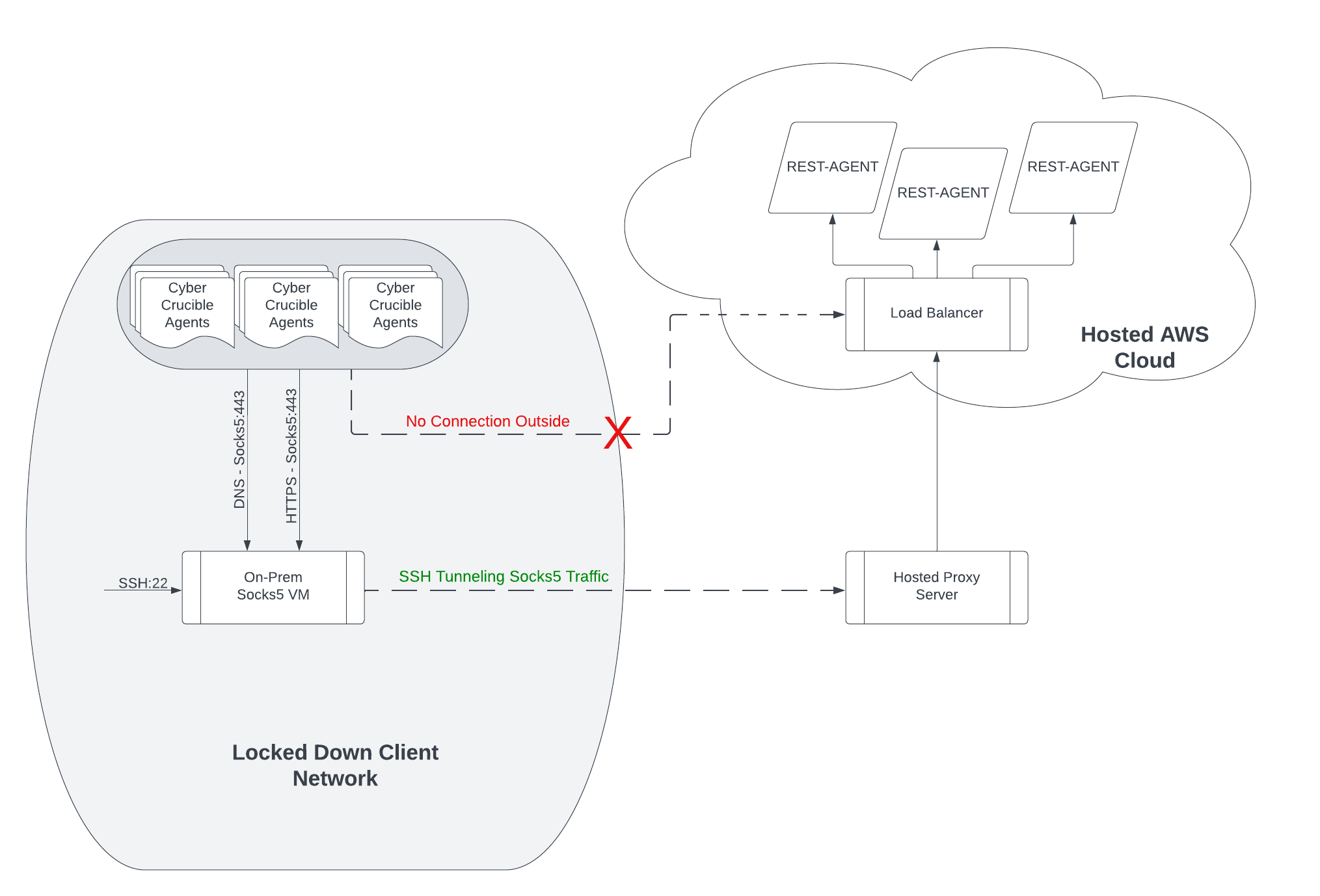
This setup allows the agents to connect to their server(s), while maintaining the network policy. Requiring only 1 rule that allows the Socks5 host to reach its external proxy server on one port (ssh). This ensures that not only is all traffic on 443, but also doubly wrapped in SSH before leaving the network, and requires no inbound port-forwarding.
# How do I uninstall multiple agents at once?
Uninstalling multiple agents at once is simple.
Travel to the Agents page.
We recommend using filters, such as machine name, group, IP address, or version filters to bring the most agents to the screen as possible. This is most useful for users with hundreds or thousands of agents in a group.
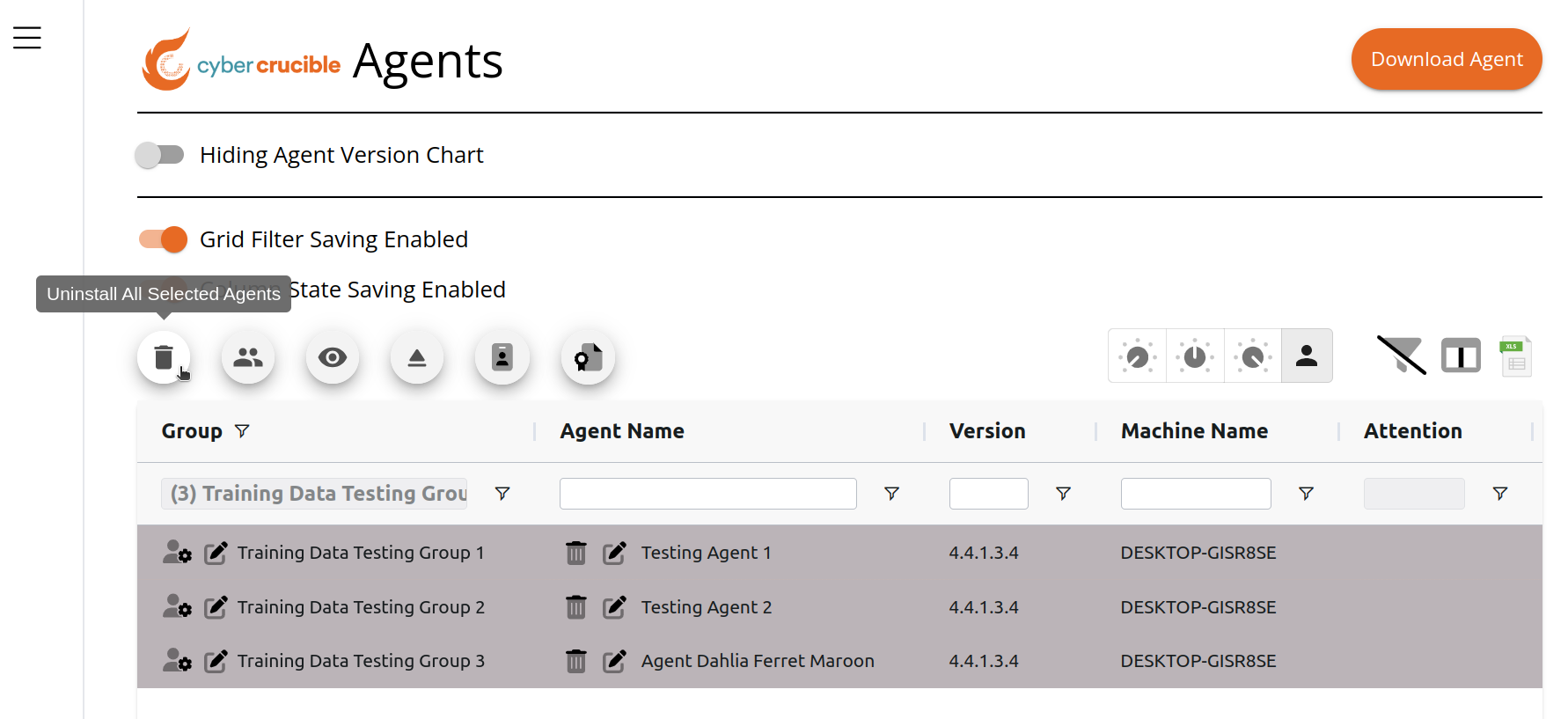Here, we used the shift key, while clicking on 3 rows, to select three agents.
The Uninstall All Selected Agents is on the top left above the grid.
After permissions are checked on the server, that you have permission in the agents' groups, uninstall commands will be issued.
The agents receive a digitally-signed uninstall command. The signature is used by the agents to validate the command really came from Cyber Crucible, and not a criminal trying to remove your protective software.
Once the agents validate, they will prepare the system for uninstallation upon reboot.
The Attention column will have the entry “Uninstall in Progress” and show a Cancel Uninstall button in the cell.
Once the machine is rebooted, the agent validates the uninstall is being conducted, and removes all files.
Of important note - the agent will confirm “one last hello” before completely uninstalling, so sometimes agents will be present for a short period of time after reboot. This is due to some network environments not working properly for up to 30 seconds after the desktop is visible. Note that once uninstalls are finished, licenses are automatically removed from agents.
# Testing if Cyber Crucible Software is "Working"
# Introduction
Cyber Crucible is designed to run without interrupting end users or employees, while quietly notifying chosen Dashboard users (typically chosen IT and Security team members) of automated responses.
A lot of the simulators for ransomware or malware do not accurately capture a hacker’s behavior. Even though that causes issues for tools like Cyber Crucible that (correctly) identify the simulation as a false positive, that isn’t necessarily a bad thing.
Some vendors will actually build their detection engines around these simulators for some of their detection functionality, to ensure that any customer tests pass with flying colors.
Real malware actions like ransomware encryption run the risk of unrecoverably encrypting or corrupting data. At Cyber Crucible, we’ve even seen ransomware secretly activates other malware on the network, or do other actions that could harm the company trying to test Cyber Crucible.
So, you don’t want to use malware, and you don’t want to use a simulator so accurate that you might accidentally corrupt your data.
# Testing Cyber Crucible
There is an easy way to test Cyber Crucible without using malware or a simulation so realistic you put your or your company’s data at risk.
Cyber Crucible assesses digital identity accesses at every millisecond of the day. A lot of those digital identities are stored in the browsers - that is why attackers put web browsers to the top of the list for their automated targeting.
Cyber Crucible identity access behavioral analysis will result in one of three responses:
1. Do Nothing
2. Hide the data
1. known legitimate application that passes all memory and kernel checks, but does not need access to that particular identity data - example: unexploited Windows Explorer
3. Suspend the process
1. known legitimate application that should have access to the identity data but is hacked, or
2. a strange application
Here are two locations that are common for Windows users:
In this case, the Windows username is “denni”, and these are the location where session data is stored. You may find the variable %LOCALAPPDATA% works for you if you don’t want to figure out the username.
- C:\\Users\\denni\\AppData\\Local\\Google\\Chrome\\User Data\\Default\\Sessions
- %LOCALAPPDATA%\\Google\\Chrome\\User Data\\Default\\Sessions
- C:\\Users\\denni\\AppData\\Local\\Microsoft\\Edge\\User Data\\Default\\Sessions
- %LOCALAPPDATA%\\Microsoft\\Edge\\User Data\\Default\\Sessions
## The View Without Cyber Crucible Installed
Let’s first see what one of these folders looks like with Explorer.exe, without Cyber Crucible Installed.
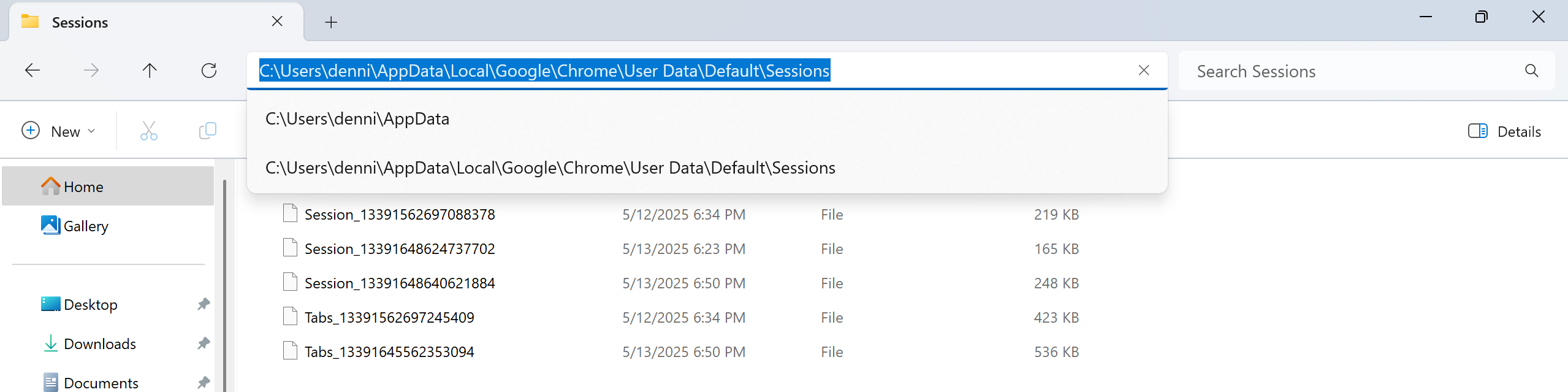Here, we see multiple Chrome Sessions under the “default” Google Chrome profile.
This information typically contains sensitive information that an attacker would want to hijack sessions with important programs like IT administration portal, banking, email, or storage tools like Google Drive or Dropbox.
## The View With Cyber Crucible Installed
After installing Cyber Crucible, a quick test may be conducted, without using malware or any type of criminal techniques or misuse of IT equipment.
In this case, the same browser session storage location is used:
- C:\\Users\\denni\\AppData\\Local\\Google\\Chrome\\User Data\\Default\\Sessions
- %LOCALAPPDATA%\\Google\\Chrome\\User Data\\Default\\Sessions
- C:\\Users\\denni\\AppData\\Local\\Microsoft\\Edge\\User Data\\Default\\Sessions
- %LOCALAPPDATA%\\Microsoft\\Edge\\User Data\\Default\\Sessions
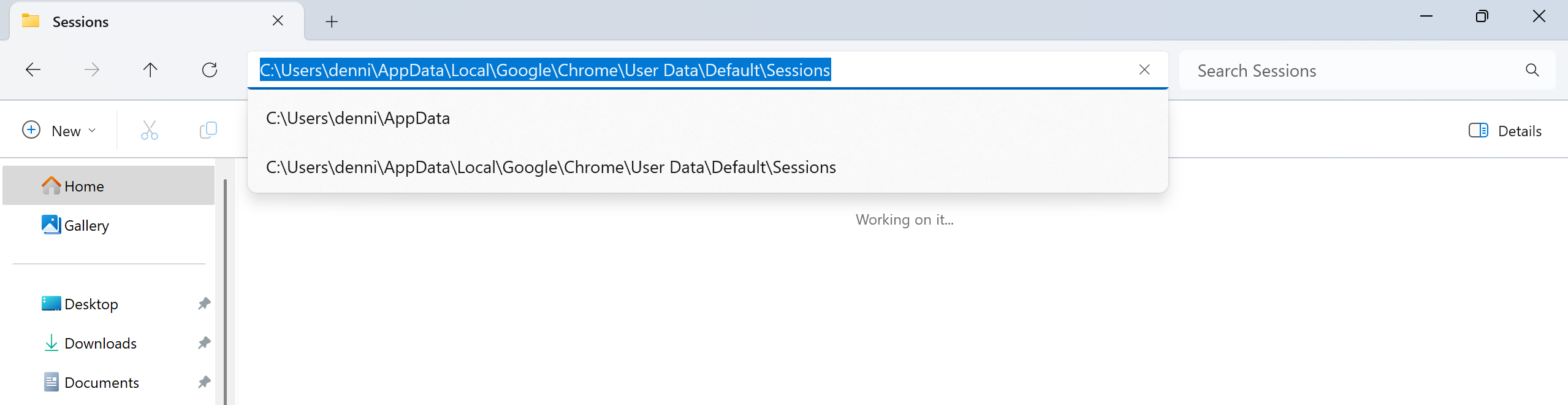Cyber Crucible immediately after installation is already blocking access to the data in that folder.
Please notice that this is the exact same Explorer process that was already running upon installation, so the program running suddenly has had access revoked at the “hard drive” or kernel layer. Even programs, benign, exploited, or malware that are already running are correctly assessed by Cyber Crucible.
## Seeing your test in the Cyber Crucible Dashboard
There are a large number of identity data accesses in a running system, at all times.
Software as a Service and cloud-based programs have resulted in many websites and applications that have limited on the website itself, while the browser (or embedded browser for applications) constantly communicates with data servers to populate spreadsheets, tables, graphs, and social media content.
### Identity Access page
Identity accesses that are deemed appropriate for Cyber Crucible to suspend the offending application are listed in the Identity Access page.
These are situations where the program accessing the identity data should be stopped, not just have data hidden.
In this case, Explorer was not stopped after the multitude of checks Cyber Crucible conducted. Instead, data was just hidden.
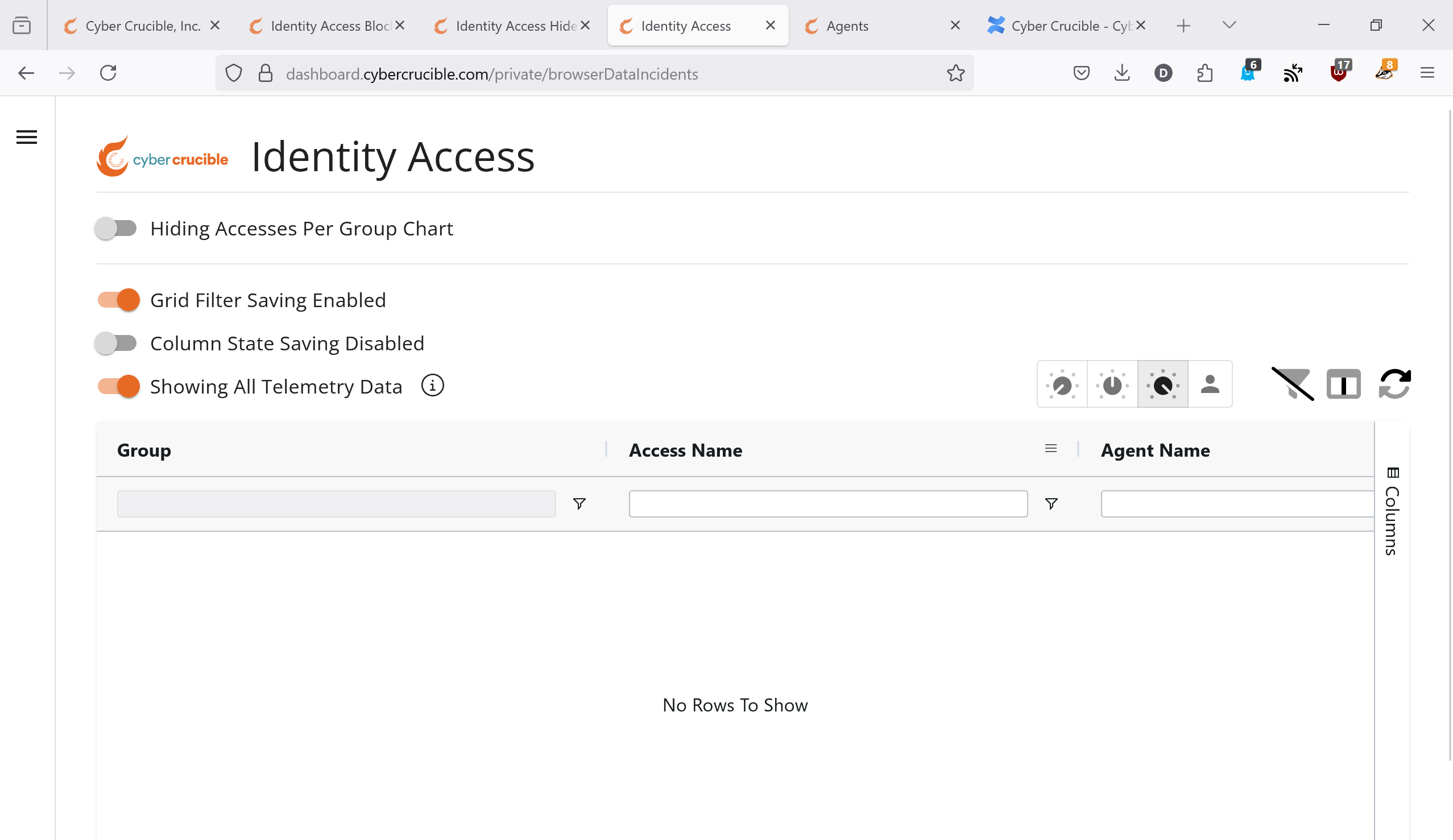Therefore, there are no identity access violations listed here.
### Identity Access Hide page
Cyber Crucible optionally has the ability to show Dashboard customers situations in which identity data was hidden, but which there the accessing program was not stopped.
Explorer was not exploited or otherwise malicious in this test, it was just accessing very privileged identity data for the Chrome and Edge browsers.
Most users do not have access to this information given the additional load on the customers' machines and networks transmitting that data to Cyber Crucible servers.
Please ask if you would like access, but please know the activity you are seeing is not malicious activity, but identity data privacy behaviors Cyber Crucible conducts on a GRC, or policy enforcement, perspective.
[Identity Hide Explorer.mp4](%5BATTACHMENT%3AIdentity%20Hide%20Explorer.mp4%5D)Here, we see in this short video, that Explorer was blocked from viewing the browser session data, even though Explorer itself was not interrupted.
# Script to Release Licenses for Machines Using a CSV File
- [Script Arguments](#bkmrk-script-arguments)
- [Download the Script](#bkmrk-download-the-script)
- [How to Run the Script](#bkmrk-how-to-run-the-scrip)
- [How to find Your Refresh Token](#bkmrk-how-to-find-your-ref)
Cyber Crucible has created a Powershell Script that can take in a CSV file path containing Net bios machine names to automatically release licenses from.
# Script Arguments
The script takes in a few arguments in order to run:
- CSVPath
- This is the path of the CSV file that contains the machine names of agents whose licenses should be released
- The format of this file should be .csv and the delimiter should be a comma
- MachineNameHeader
- This is the header name of the column that contains the machine names
- The CSV file must have a header row
- AgentLastActiveDays (Optional)
- By default, the script will not release the licenses of agents with matching machine names that have called in within the last 30 days. You may pass a different number to this argument if 30 days is not desired
- RefreshToken
- Your refresh token can be found on the Rest Integration Page. See the “How to find Your Refresh Token” section for more
- CaseSensitive (Optional)
- A Switch parameter indicating if the script should use case-sensitive matching on the given machine names from the CSV file when finding the corresponding agents.
- By default, the script will use case-insensitive matching
- TrainingMode (Optional)
- A Switch parameter indicating if the machine names are training mode data.
- Only include this argument if the machine names are for training mode data, otherwise do not include
- DemoMode (Optional)
- A Switch parameter indicating if the machine names are demo mode data.
- Only include this argument if the machine names are for demo mode data, otherwise do not include
# Download the Script
[](%5BATTACHMENT%3A%5D)
# How to Run the Script
After downloading the script and finding your refresh token, open Powershell and navigate to where you have downloaded the script. Then you can run the script with the arguments defined above. An example command to run the script can be seen below:
.\\ReleaseLicensesFromMachines.ps1 -CSVPath "C:\\Users\\user\\Documents\\csvFile.csv" -MachineNameHeader "MachineName" -RefreshToken "token"
The script will look for your agents that have matching machine names from the CSV file and remove their licenses. The script may take a few minutes to finish running and should be left running until it finishes.
Please note that if you have multiple agents with the same machine name, all of these agents will have their license removed if the machine name is included in the CSV file. Agents with matching machine names that have called in within the specified number of days in the AgentLastActiveDays argument (Default of 30 days, see argument definition above) will not have their license removed.
# How to find Your Refresh Token
You will need a refresh token to be able to run the script, which can be found on our [website](https://dashboard.cybercrucible.com/login) on the Rest Integration page:
# How much data is produced by Cyber Crucible?
The data collected by the Cyber Crucible agent goes through multiple layers of filtering, in order to cut out noise from having too much raw telemetry. The raw data produced by the kernel sensors is trimmed down \[**Filter #1**\] to reduce both endpoint memory usage, and network bandwidth per-agent. Following that, the REST API will associate raw process/endpoint telemetry it receives to automated responses, such that the analyst can choose to view only relevant data \[**Filter #2**\].
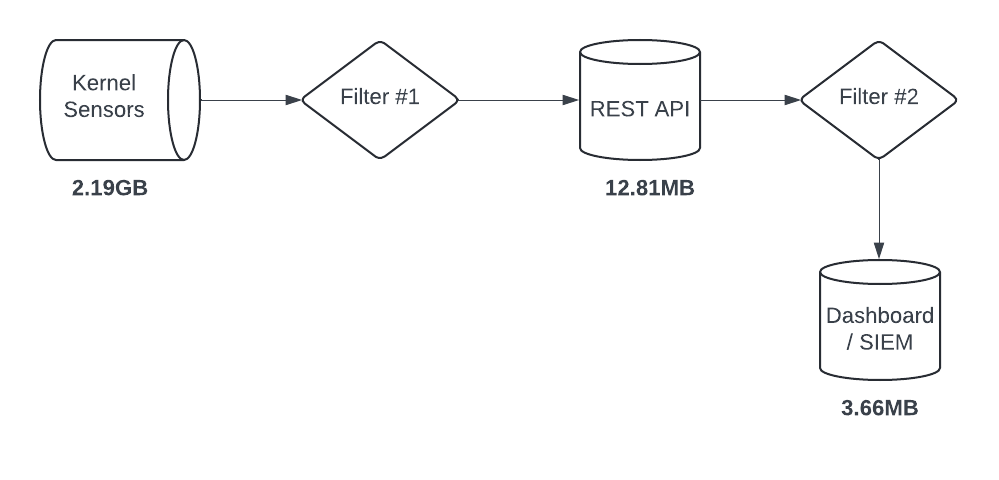
As seen in the figure above, an average customer’s workstation endpoints may produce multiple gigabytes of raw sensor data over a 24hr span, whereas only a few megabytes of which will be relevant to a SOC alert if an attack is attempted.
# How do I uninstall a single agent?
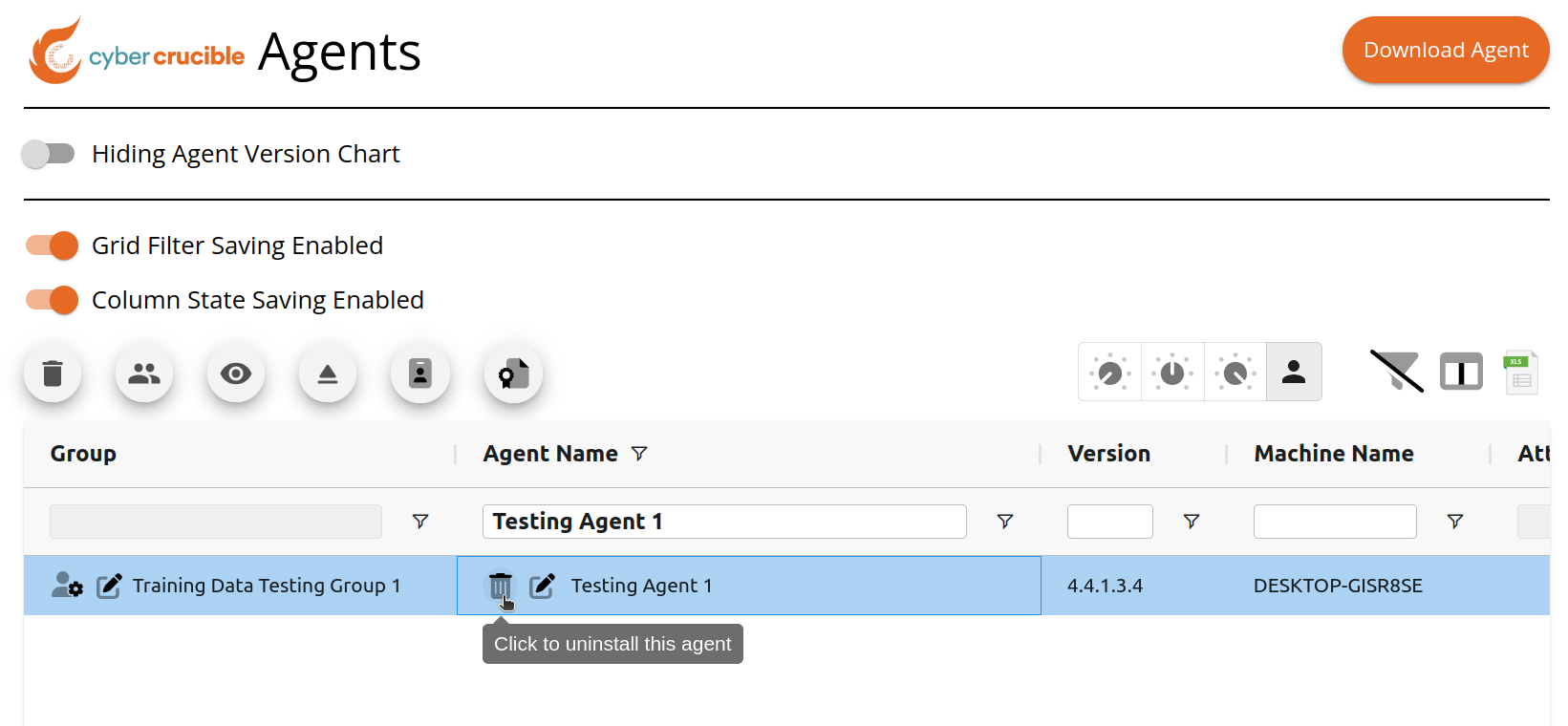
Travel to the Agents page.
Locate the desired agent, and click the trash icon in the Agent Name column:
# How to Manage Proxy Configurations
- [Where to Find a Group’s Current Proxy Configuration Setting](#bkmrk-where-to-find-a-grou)
- [How to Update a Group to Enable a Proxy Server](#bkmrk-how-to-update-a-grou)
- [How to Update a Group to Not Use a Proxy](#bkmrk-how-to-update-a-grou-1)
- [How to Remove a Saved Proxy Configuration in a Group](#bkmrk-how-to-remove-a-save)
- [How to Install an Agent Using a Proxy](#bkmrk-how-to-install-an-ag)
- [Where Can I See if an Agent is Able to Bypass the Proxy?](#bkmrk-where-can-i-see-if-a)
Note that only agents on version 4.4.6.3 and higher have this capability
# Where to Find a Group’s Current Proxy Configuration Setting
Users can view a group’s current proxy server configuration setting for agents in this group to follow by first navigating to the Groups page found under the Administration tab in the sidebar.
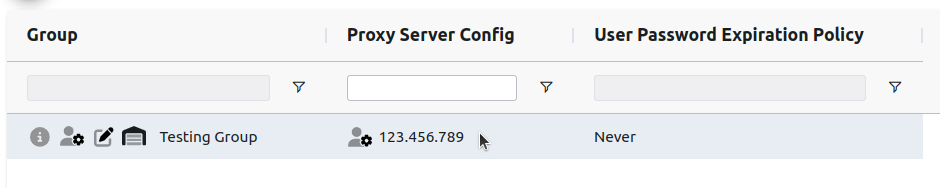
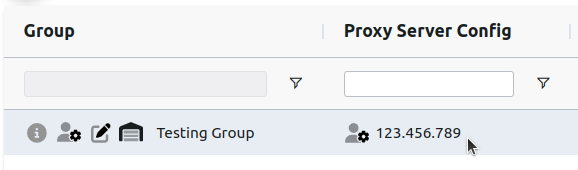
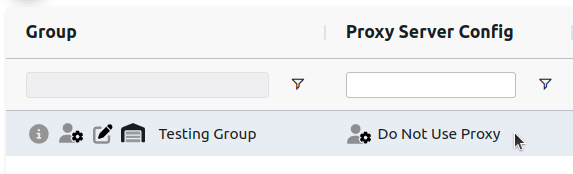
A group’s current proxy server config setting can be found in the “Proxy Server Config“ column on the grid.
If the group does not have a proxy server config enabled, the “Do Not Use Proxy“ text will be shown.
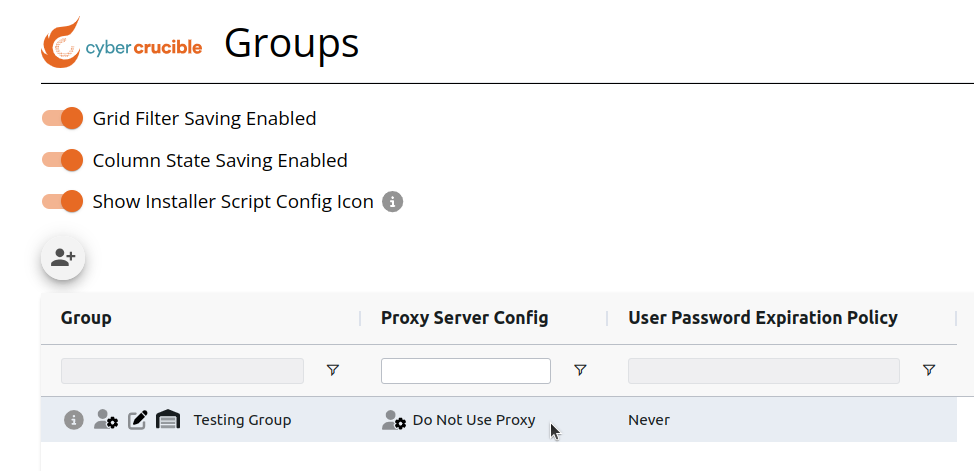If the group has a proxy server config enabled, the current proxy config’s URL will be shown
# How to Update a Group to Enable a Proxy Server
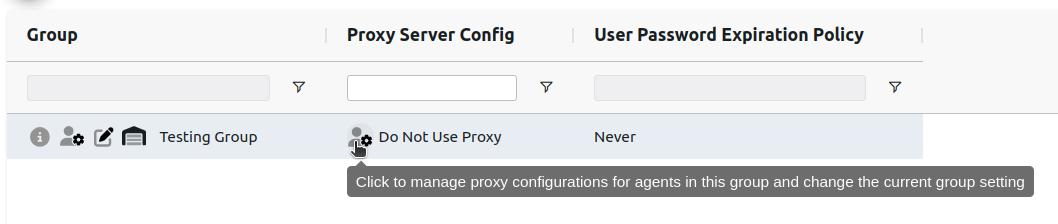
Users can enable agents in a group to use a proxy server by first clicking the manage proxy configurations icon in the “Proxy Server Config” column on the Groups page. Clicking this icon will popup a modal where users can manage the proxy server configurations for the group.
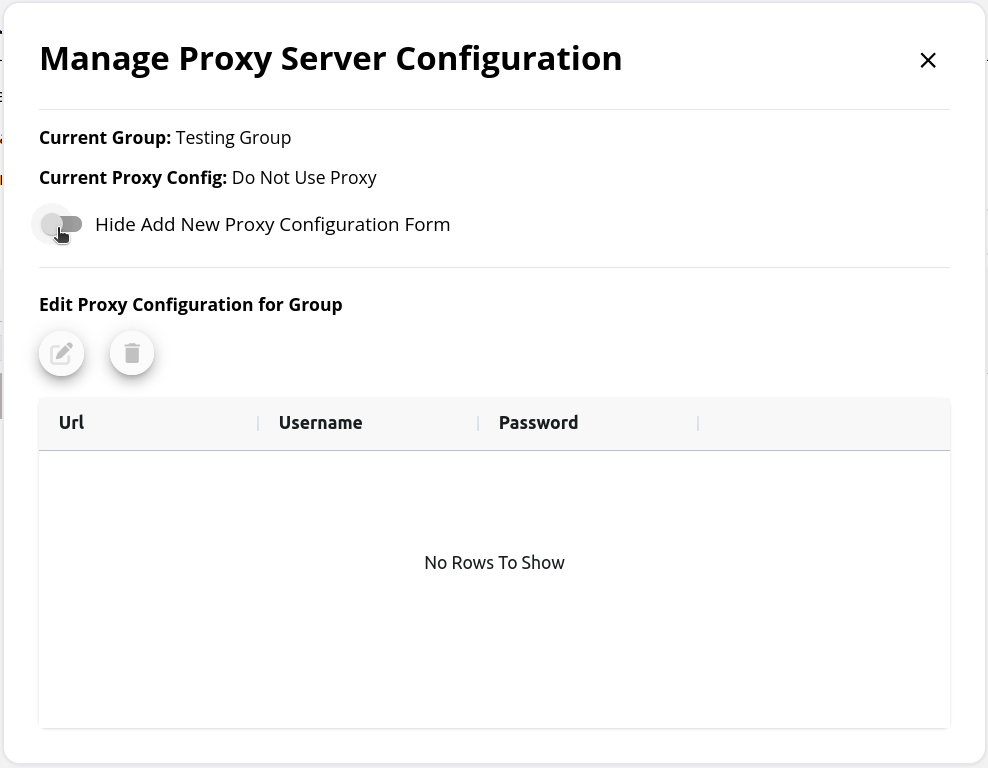
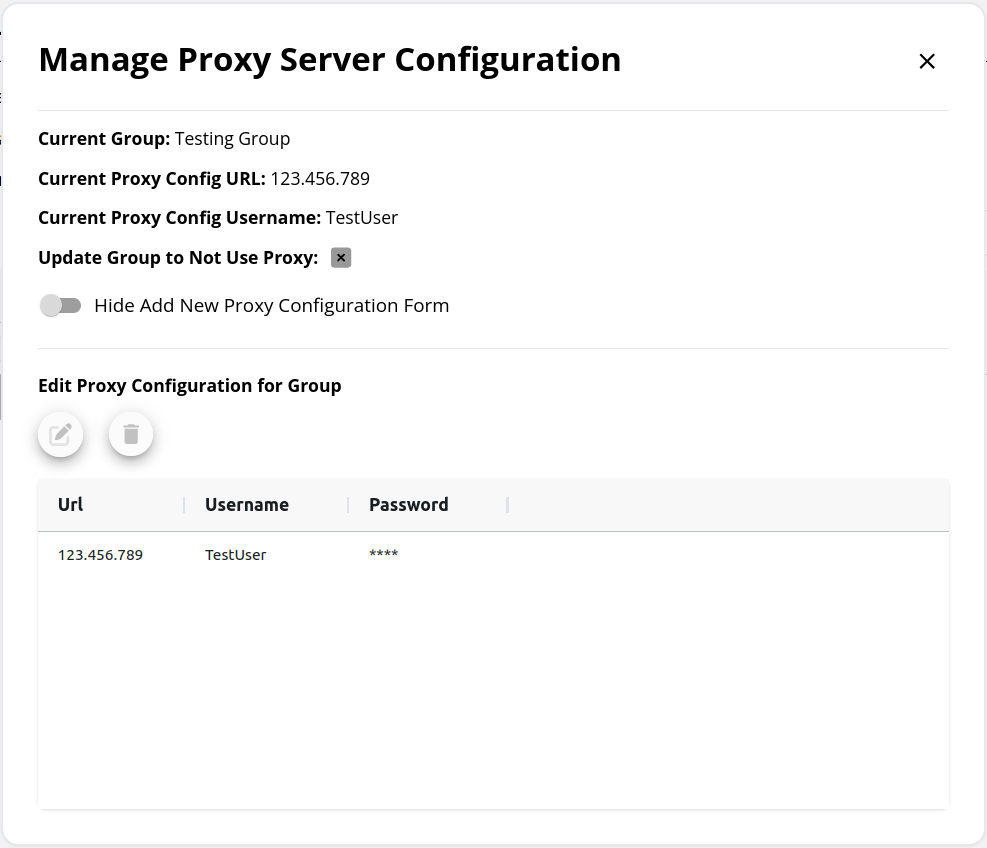
The Manage Proxy Server Configuration modal that appears is used to view and manage the proxy server configurations for the group. Users can save multiple configurations inside a group, and all saved configs are shown on this modal’s grid. Note that all saved proxy server configurations for a group will appear on the Download Agent modal as well.
In order to select a proxy server configuration for the group, the config must first be submitted on the New Proxy Configuration Form. This form is hidden by default, click the toggle to display it.
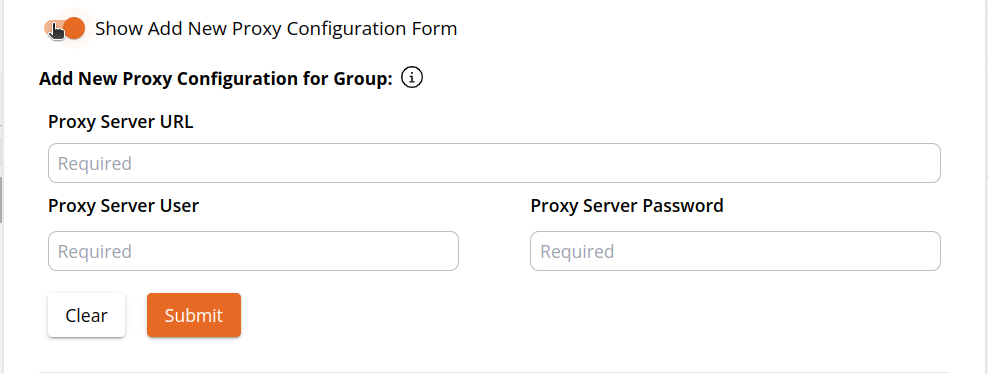After submitting the new configuration form, it will be shown below on the modal’s grid.
To select a proxy configuration for agents in this group to use, first select the desired configuration, then click the edit icon above the grid.
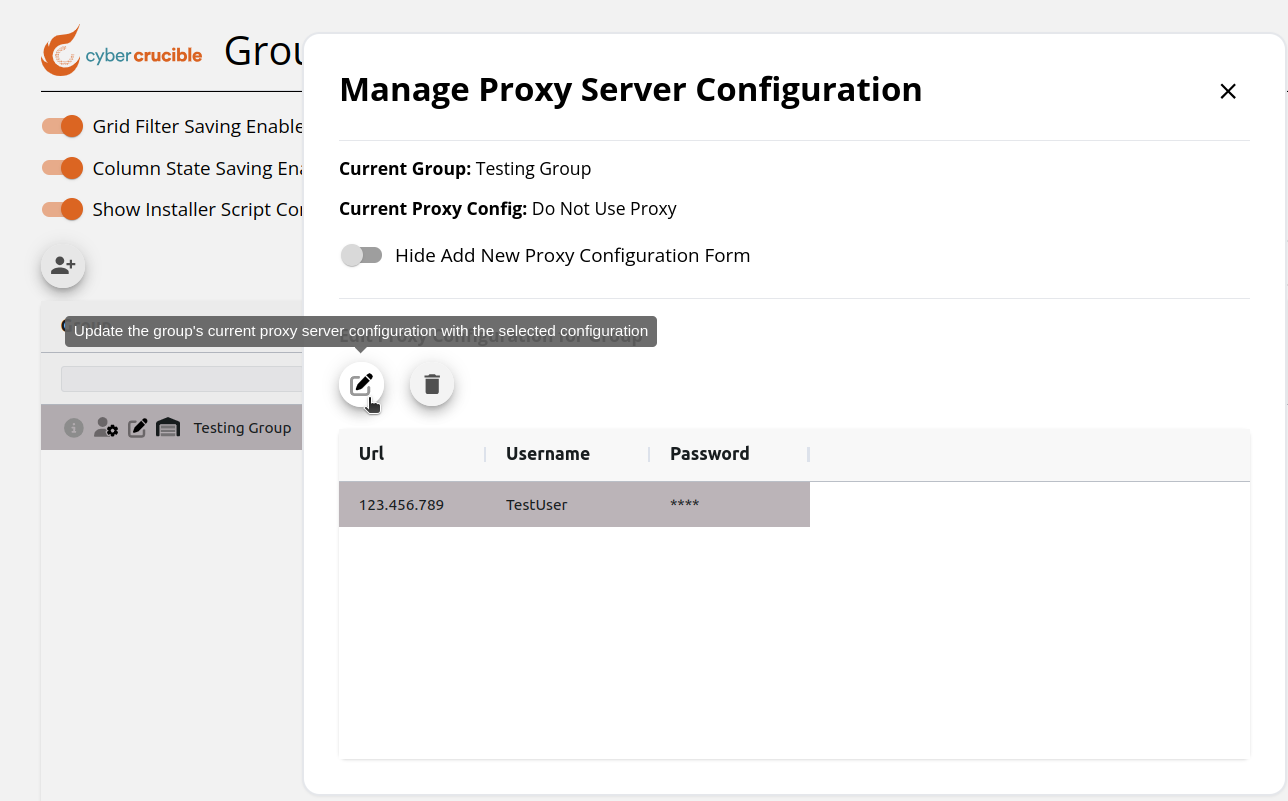After clicking the edit icon for the desired proxy configuration, the group’s current proxy server config is now updated and can be seen on this modal and in the “Proxy Server Config” column. Agents in this group will now use the group’s updated proxy configuration. Note that if an agent receives instructions to switch to an unreachable proxy server it will not switch until that server becomes reachable.
# How to Update a Group to Not Use a Proxy
If a group has a proxy server enabled for agents in this group to use and users want to update the group so that agents in this group will not use a proxy, first navigate to the Groups page and locate the desired group on the grid.
Then click the manage proxy configurations icon in the “Proxy Server Config“ column. Clicking this icon will pop up the Manage Proxy Server Configuration modal.
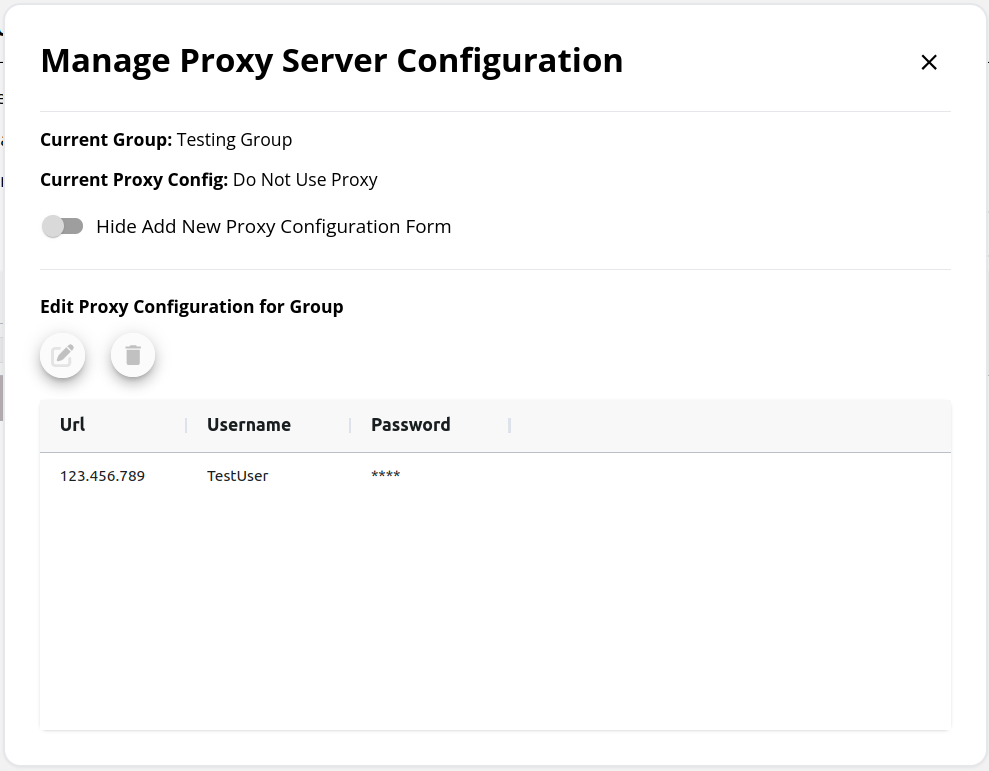
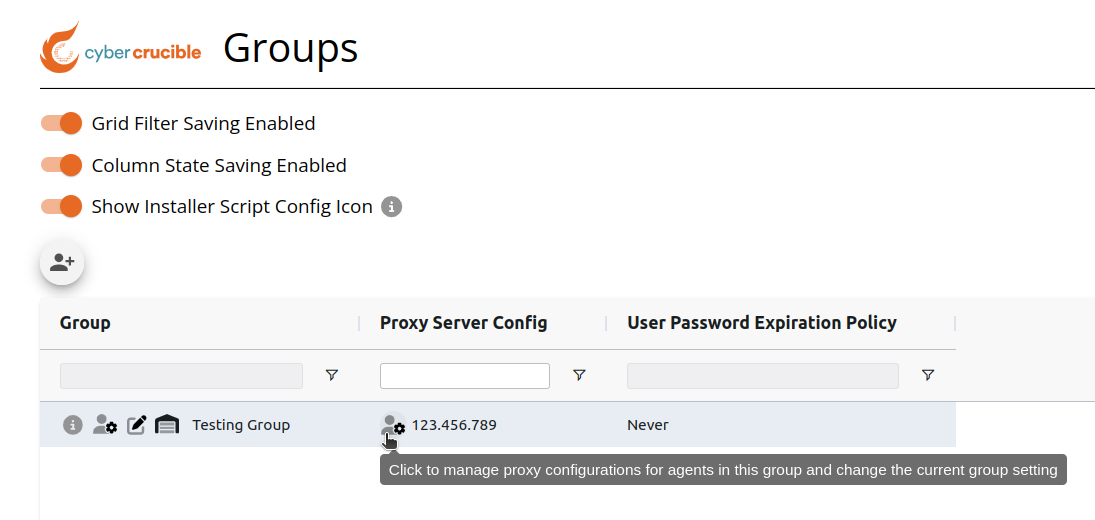On this modal, click the x icon to update agents in this group to not use a proxy server and call to our servers normally. Note that the current proxy configuration will not be removed from the group’s saved proxy configurations, this is a separate step explained in the section below.
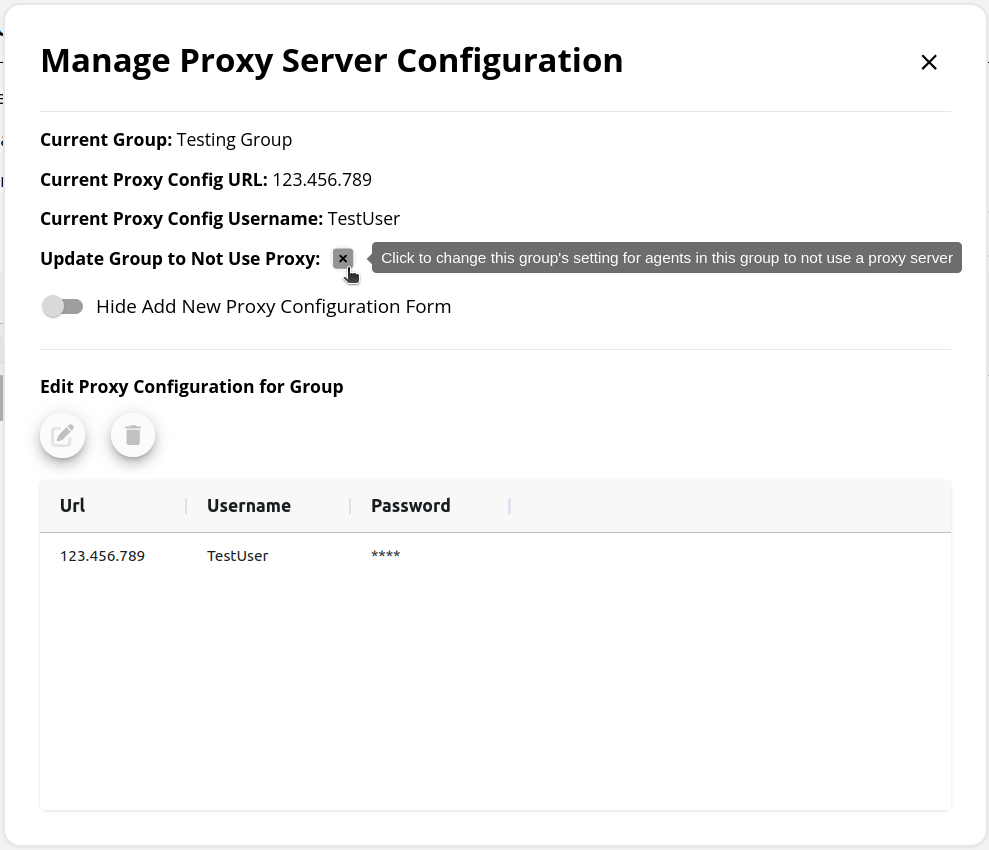After clicking the x icon, the modal will be updated to reflect this change and the “Proxy Server Config“ column for this group will now show “Do Not Use Proxy“.
# How to Remove a Saved Proxy Configuration in a Group
To remove a group’s saved proxy configuration, first navigate to the Groups page and locate the desired group on the grid.
Then click the manage proxy configurations icon in the “Proxy Server Config“ column. Clicking this icon will pop up the Manage Proxy Server Configuration modal.
On this modal, click the desired saved proxy configuration to remove for this group, then click the trash icon. After clicking this icon, the selected proxy configuration will no longer appear in the grid as a saved proxy configuration for the group.
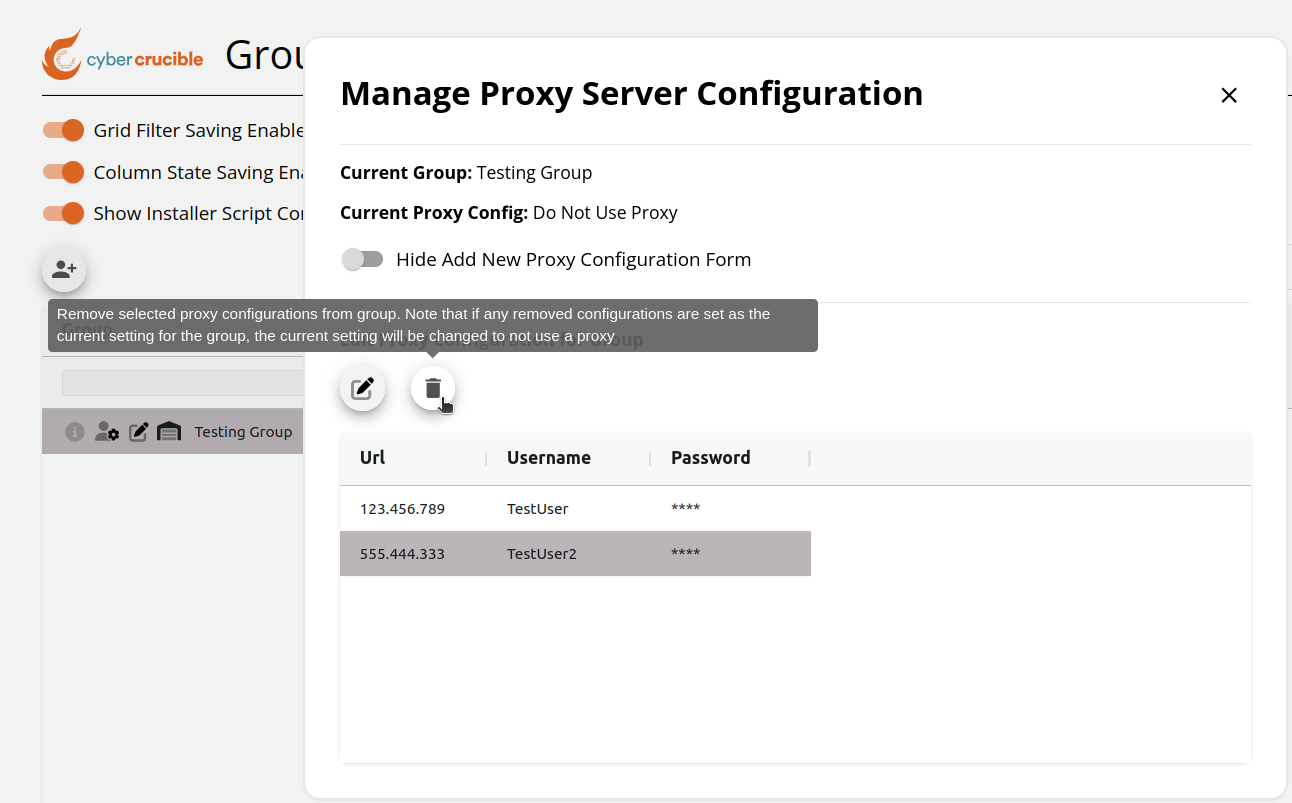Note that if you remove a saved proxy configuration for a group and this configuration is set as the current proxy server configuration for the group, this will also update the group’s current proxy server configuration to not use a proxy.
# How to Install an Agent Using a Proxy
First, navigate to the Agents page found under the Operations tab in the sidebar. Then click the Download Agent button. Clicking this button will popup the Download Agent modal.
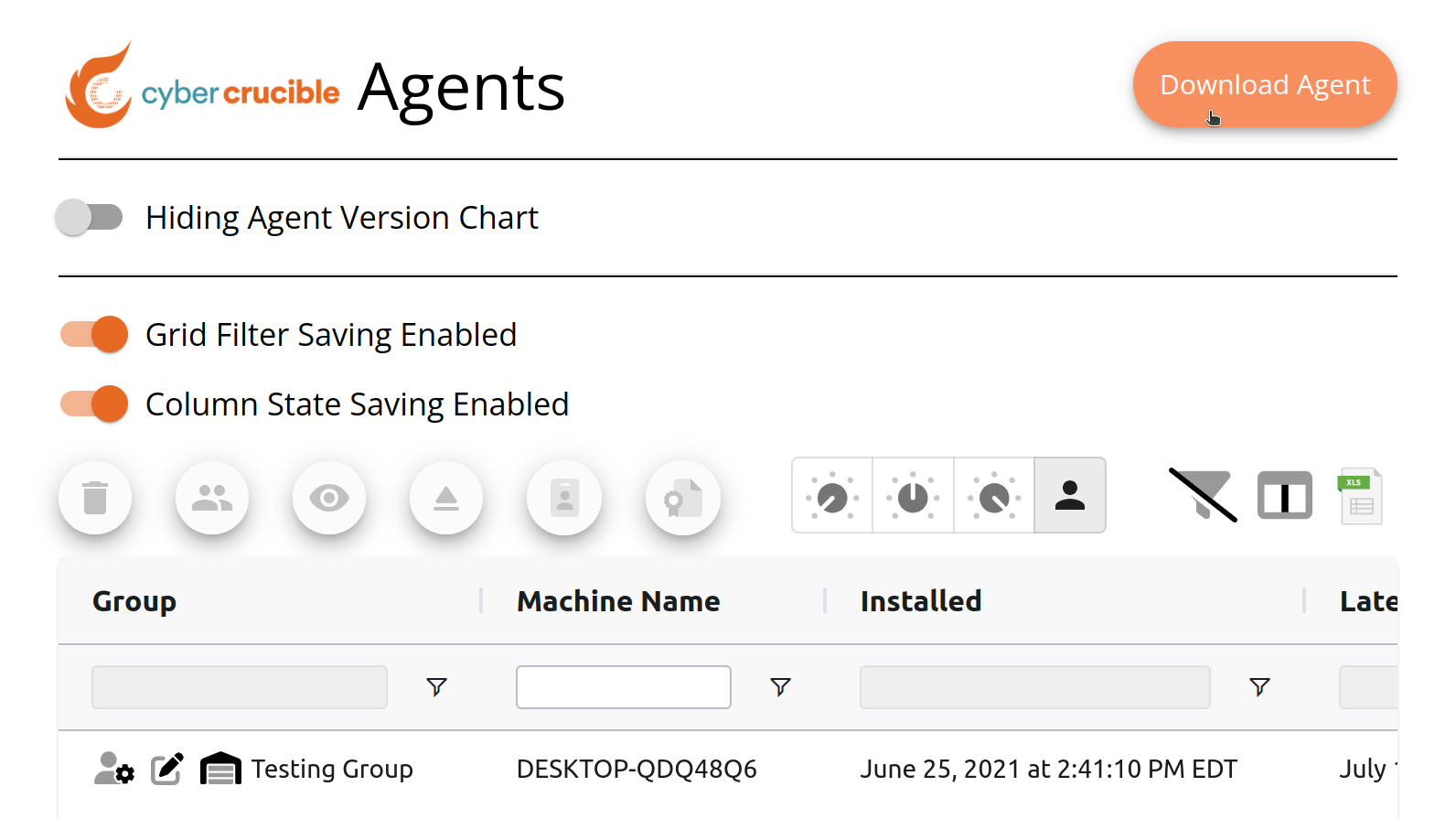On this modal, if you select a group that has saved proxy configurations, the Select Proxy Configuration for Installer option will appear with the group’s current setting selected as the default value. All of the group’s saved proxy configurations will appear as options as well, including a Do Not Use Proxy option.
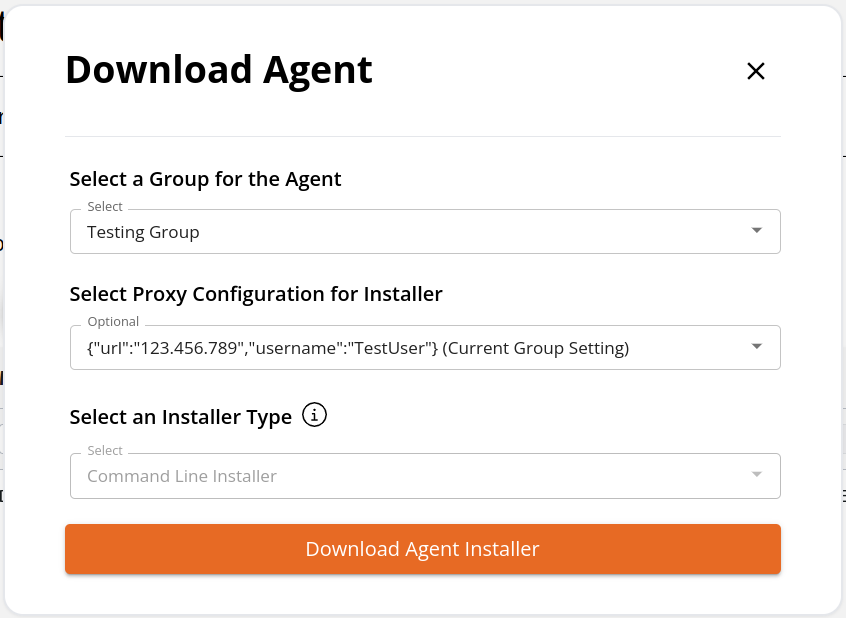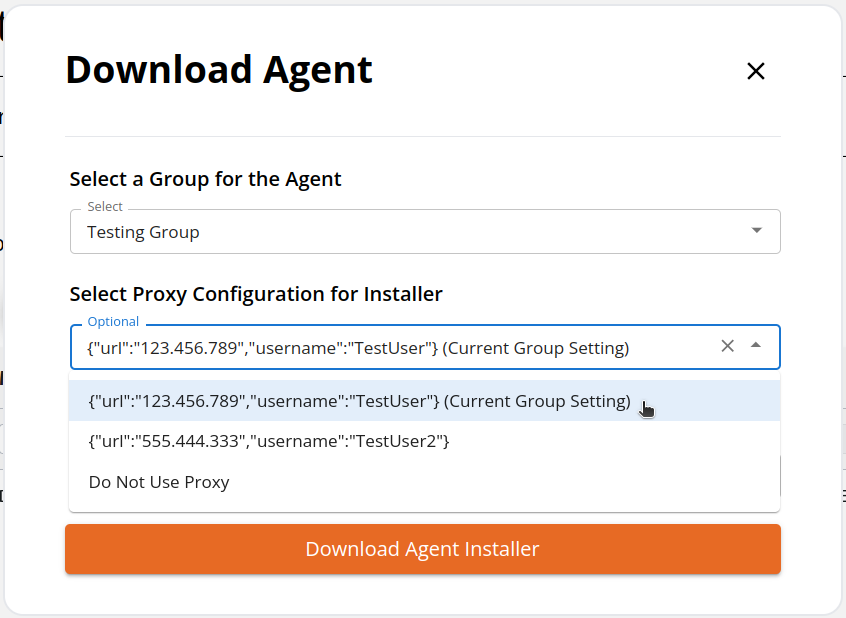When opting to use a proxy for the installer, the only possibly installer type is the Command Line Installer.
If you select the Do Not Use Proxy option, our normal installer type options will appear.
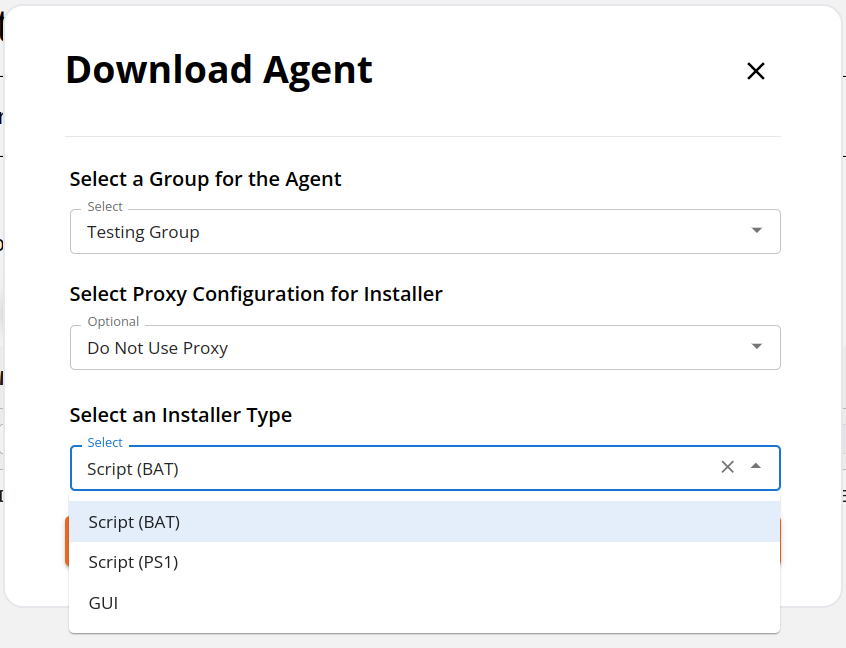Note that if you select a proxy configuration for the installer that is not the group’s current setting, the installer will run with the selected setting and then switch to the group’s current proxy configuration setting after installing.
# Where Can I See if an Agent is Able to Bypass the Proxy?
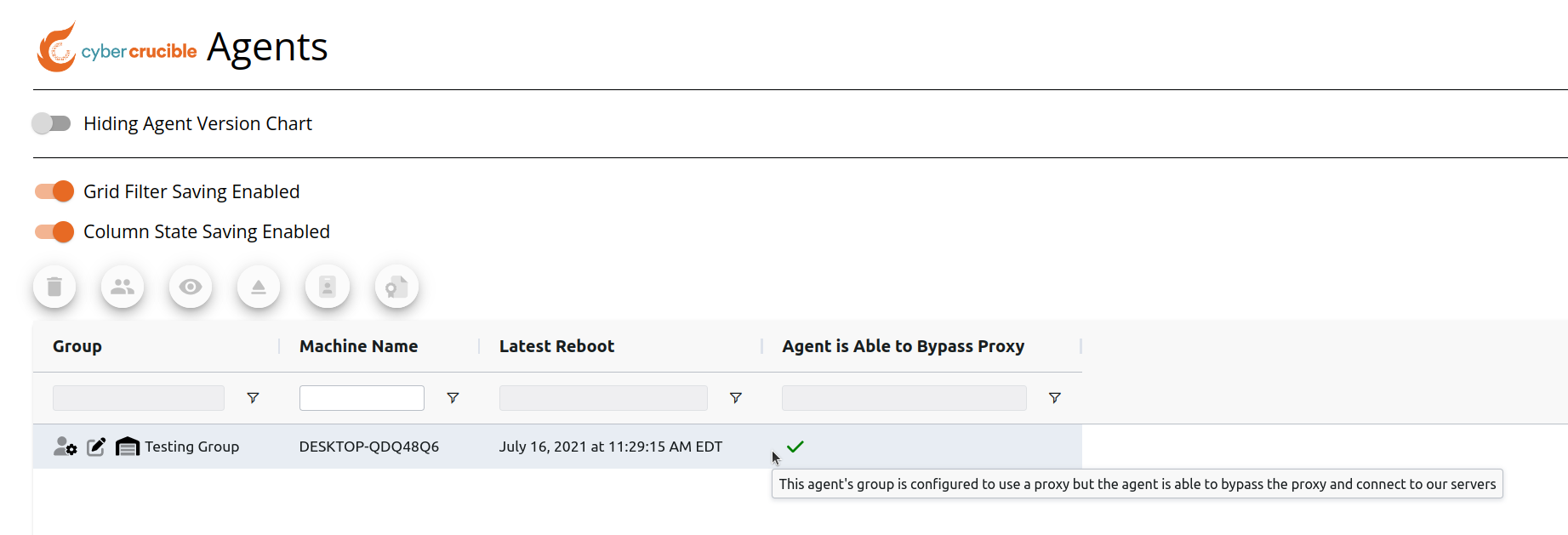
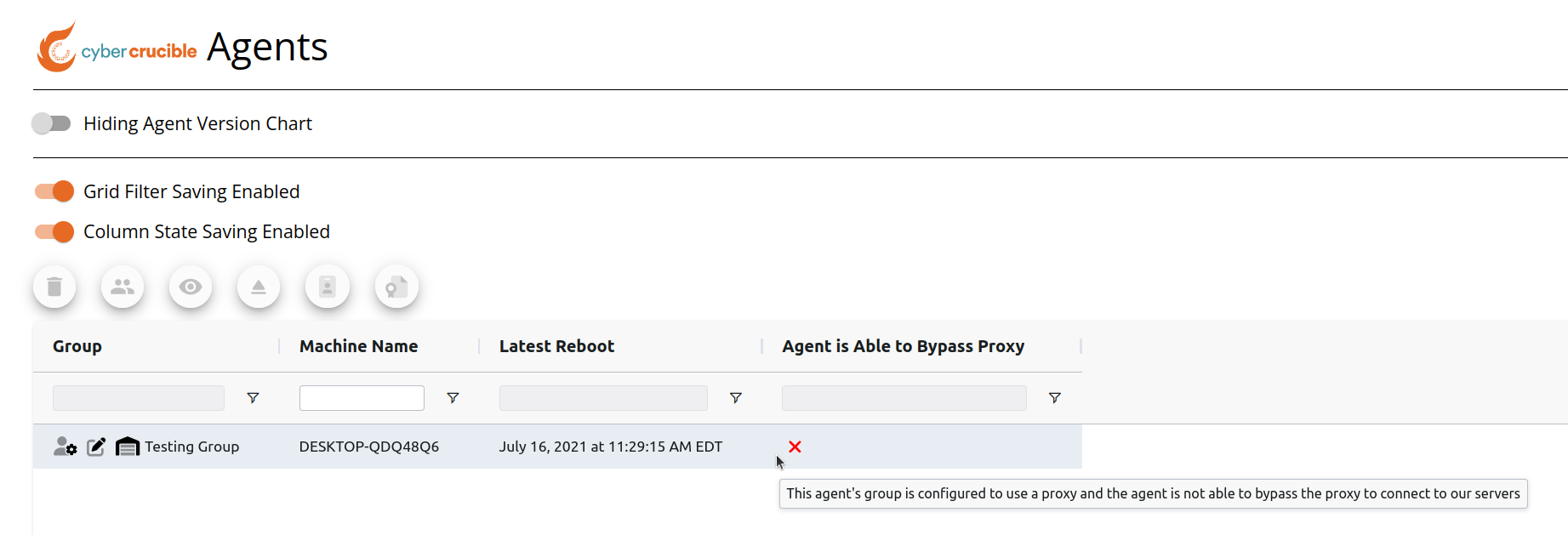
Users can view if agents can connect to our servers without using a proxy by first navigating to the Agents page found under the Operations tab in the sidebar. Then locate the Agent is Able to Bypass Proxy column on the grid.
Note that the Agent is Able to Bypass Proxy column will not be visible unless the user is a member of a group that has enabled agents in the group to use a proxy.
If the agent is in a group that has enabled the use of a proxy and the agent cannot bypass the proxy to connect to our servers, the red x will be shown in the column. See an example of this below:
If the agent is in a group that has enabled the use of a proxy and the agent is able to bypass the proxy and connect to our servers normally, the green check-mark will be shown in the column. See an example of this below: